How to Set a Limit for Pay as You Go Option?
Last updated: June 5, 2025
Tavily offers a "Pay as You Go" pricing option, allowing you to manage your usage flexibly. To avoid unexpected costs, you can set a monthly limit for your usage. Here’s how you can set a limit:
Access Your Plan Settings
Go to your plan settings page by visiting this link.Find the "Pay as You Go" Section
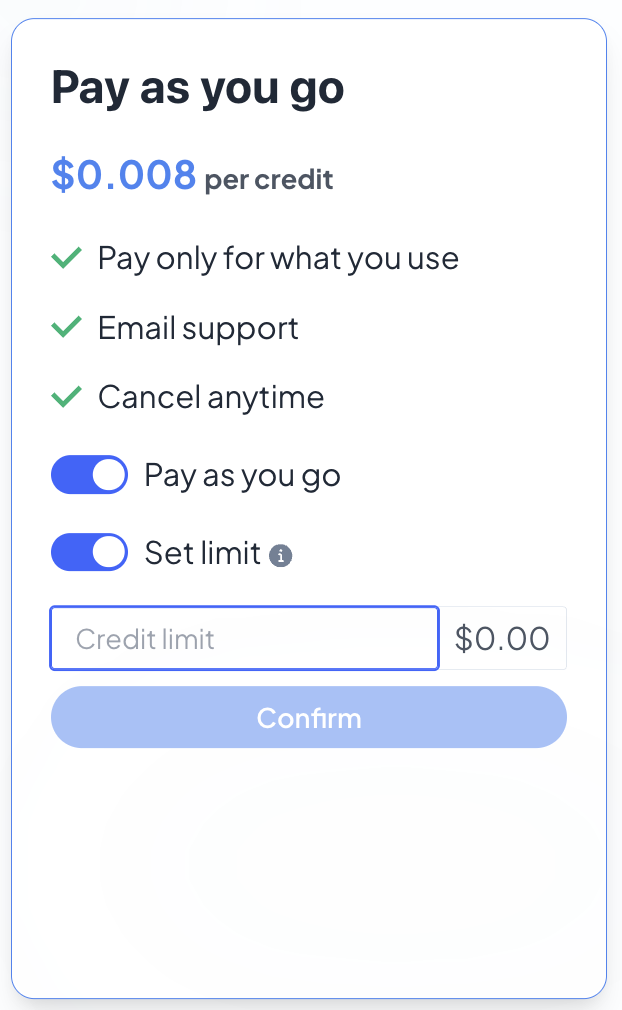
In your billing settings, locate the "Pay as You Go" section. Here, you’ll find the option to set a usage limit.Enable the Limit Toggle
In the "Pay as You Go" section, find the toggle button to enable the usage limit feature. Switch it to "on" to activate the limit setting.Set Your Monthly Limit
Once the toggle is enabled, you’ll see a field to enter your desired monthly usage limit. Enter the amount you’d like to set for the month.Click Confirm
After entering the limit, click the Confirm button to save your settings. Your monthly limit will now be applied, and you’ll receive notifications if you approach or exceed the limit.